Flower Nose AI Video Generator
Also called: Flower in Nose, Nose Flower Trend, I Hope He Buys You Flowers, Flower in Nostril, Flowers in Nose AI
Turn one photo of yourself, an adult friend or your pet into the Flower Nose video: a selfie close-up where a hand pinches the nose, the face scrunches into a squint, a thin stem is pulled slowly from one nostril and a small flower is held up to the lens, ending in a smile. It follows the original clip second by second. Every pack includes bonus previews, so you can check your photo first.
8s HD video from $8.99 · no subscription · 9:16 or 16:9 · Full video, no watermark · No subscription
Make my video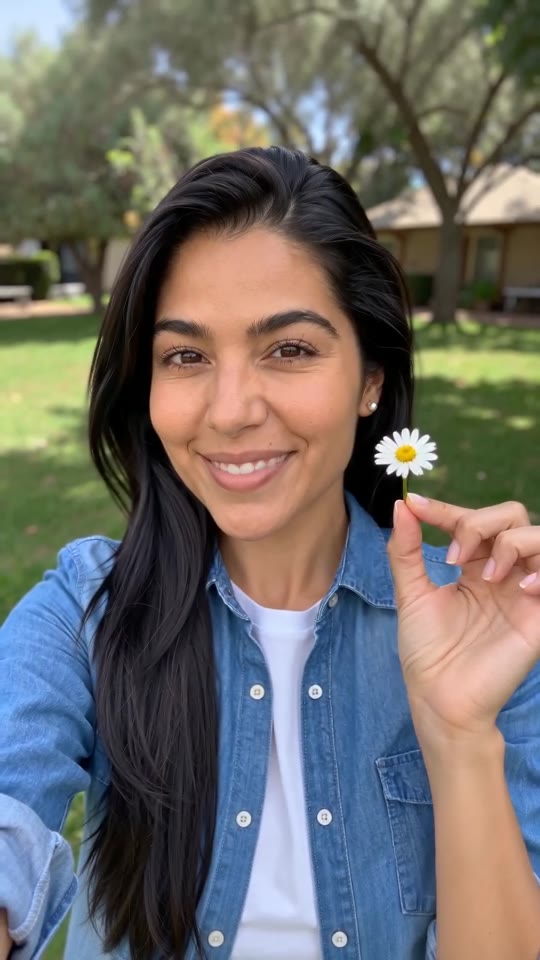 Made with MimicZip
Example frame. Your video uses your own photo.
See the pinch, the squint and the pull
This clip was made with MimicZip from an AI-generated photo of a fictional woman. Your result follows your own photo, so it will look different.
- Made with MimicZip
A woman pulls a daisy out of her nose
A woman with long black hair and a denim shirt in a sunny garden pinches her nose, squints, slowly pulls a small white daisy from a nostril and holds it up beside her face with a smile. She is fictional and the input photo is AI-generated.
Flower: White daisy · Place: My photo's place · Face: Scrunched squint
Inputs8s · 720p · AI-generated audio · Made 2026-10-31
Generated with MimicZip
AI-generated music, which can include made-up vocals. Not the original recording.
Example people are fictional.
Unlike sites that use videos downloaded from TikTok as their examples, every example here was made on MimicZip from a single photo — what you see is what our generator actually produced.
Examples are shown for illustration, not as a promise of identical output. Faces, motion and sound change with your photo.
The trend, explained
What is the Flower Nose trend?
The Flower Nose trend, also called Flower in Nose or I Hope He Buys You Flowers, is a selfie close-up in which someone has a flower stem tucked into a nostril, pinches the nose, squints hard and slowly pulls out a small white daisy to show the camera. The joke comes from the sound: a line from “When I Was Your Man” by Bruno Mars, about hoping someone else buys her flowers.
The original was posted on 6 May 2026 by @darraghomurchu, a real person filming himself, and has about 806,000 views. A Turkish remake by @berkanaytin61 on 28 May reached about 4.9 million views and started the first big wave. On 26 October a pet account posted a dog version that TikTok labels as AI-generated, with only a few hundred views so far. Counts were read on 31 October 2026 and not audited.
MimicZip makes your own version from one photo of an adult or a pet, following seconds 2 to 10 of the original, which is the pinch, the squint, the pull and the daisy. “When I Was Your Man” is a song by Bruno Mars and is not in the video: add it in TikTok. MimicZip is an independent template tool, and your video is generated from your own photo, not made, endorsed or licensed by Bruno Mars or the owners of “When I Was Your Man”.
Read more: The original we follow (@darraghomurchu) · The Turkish remake (@berkanaytin61)
Where this trend comes from
The clip we follow
@darraghomurchu · TikTok · May 6, 2026 · 806.6K views — The clip we follow: the original, filmed with a real person. Our video matches seconds 2 to 10 of the 11-second post, and its sound starts at 2 s- @berkanaytin61 · TikTok · May 28, 2026 · 4.9M views — The Turkish remake, the most-viewed version
- @pomi_daily_life · TikTok · Oct 26, 2026 · 681 views — The first pet version, labelled by TikTok as AI-generated; few views so far
Links open the original posts. MimicZip is not affiliated with these creators.
What happens in a Flower Nose video
A 8-second video is one continuous selfie take on a fixed camera. Timings are approximate, and the 5-second preview runs through the same beats faster.
01 · 0–1.5s
Close and serious
Your face is close to the lens, calm and serious, with a thin stem already tucked into one nostril.
02 · 1.5–3s
The pinch
A hand comes up and pinches the tip of the nose while the brow furrows.
03 · 3–4.5s
The squint
Your eyes squeeze almost shut and the whole face scrunches, with the hand staying under the nose.
04 · 4.5–5.5s
The pull
The hand draws the stem slowly out and the small flower comes into view at its end.
05 · 5.5–8s
Flower up, smile
The hand drops beside your face and holds the flower toward the lens while you break into a warm smile.
Your photo decides who pulls the flower. The camera, the framing and the order of the beats are fixed, and every result comes out a little different.
How to add the original sound to your Flower Nose AI video in TikTok
Pick the song inside TikTok when you post, then turn the video's own sound down.Show the full how-to
Our video comes with new AI-made audio. To use the trending song, add it inside TikTok when you post. Our video follows seconds 2 to 10 of the @darraghomurchu clip, so the sound should start 2 seconds in.
- Open the @darraghomurchu clip in TikTok, tap the sound name at the bottom (the Bruno Mars song) and tap Use this sound.
- Upload the video you downloaded from us, or the silent version from My videos.
- Turn the video's own sound down to 0.
- Use the scissors (trim) to start the sound at its 2-second mark, so the daisy comes out on the same line as in the original, then post.

Need to move where the sound starts? This short video shows how to trim it.

Video: How To Trim Sound On TikTok 2026 (Very Easy) by Software Solutions on YouTube
How to make a Flower Nose video in 3 steps
No filming, no flower and no editing app.
Add your photo
Upload one clear photo of yourself, an adult friend or your pet, face toward the camera with the eyes open and the head and shoulders in view. JPG, PNG or WebP, up to 10 MB.
Choose your options
Pick 9:16 or 16:9, the flower (a white daisy by default), the place and how hard the face scrunches, tick the photo-consent box and log in. Every pack includes bonus 5-second previews.
Make the full video
Spend 1 credit on a 8-second 720p video. Download it, then add the song and your caption in TikTok.
Which photo works?
One photo is required: the flower-puller. It shows a single adult or a single pet, face toward the camera with the eyes open, and the head and shoulders in view.
Works well
- A clear, well-lit selfie-style photo of one adult or one pet, face toward the camera
- Head and shoulders in the frame, eyes open, mouth closed or relaxed
- JPG, PNG or WebP, up to 10 MB
- Between 300 and 6000 pixels on each side
Avoid
- Toys or drawings: this template takes adults and pets only
- Babies, children or anyone under 18
- Hands covering the nose, sunglasses, masks, or two faces in one photo
- Celebrities, anyone who has not agreed, or a screenshot of someone else’s clip
Limits: width-to-height ratio between 0.4 and 2.5. Upload only people you have permission to use.
Ways to play it
Just you
A selfie of you pulling the classic white daisy.
Your pet
A dog or a cat sits up and plucks the flower with a paw.
A different flower
Swap the daisy for a rose, a sunflower, a tulip, cherry blossom or a poppy.
A different face
From a mild frown to a dramatic wince or a deadpan stare.
Why people use it
Bonus previews in every pack
See the daisy come out before you spend a credit.
Follows the original clip
Pinch, squint, pull, show: the same beats as the real-person video.
Pets and people
Any pet with a clear face works, and so does an adult.
Six flowers
A white daisy is the classic; a rose, a sunflower, a tulip, cherry blossom or a poppy are one click away. Same price.
No subscription
Buy credits once. They never expire.
Works on your phone
Pick a selfie from your camera roll and download a video ready for TikTok, Reels or Shorts.
Flower Nose AI: frequently asked questions
What is the Flower Nose AI trend?
A selfie close-up where someone with a stem in the nostril pinches the nose, squints and pulls out a small white daisy for the camera. AI versions put you or your pet in the lead. The explainer guide has the timeline.
How do I make the Flower Nose video with my photo?
Upload one photo of yourself or your pet, pick the flower and the place, check your photo with a 5-second bonus preview, then make the full 8-second 720p video for 1 credit. There is no prompt to write. The how-to guide covers each step.
Can I try it for free?
Not at the moment. MimicZip has no free tier or free preview; one full 8-second 720p video costs 1 credit, and packs start at $8.99. Every pack includes bonus watch-only previews so you can check your photos before spending a credit. There is no subscription, and the full video has no watermark.
Which song does the Flower Nose trend use?
Most posts use “When I Was Your Man” by Bruno Mars, at the line about hoping he buys you flowers. We do not include it. The sound guide explains how to add it in TikTok.
Can I add the original sound and will it line up?
Yes. Our video follows seconds 2 to 10 of the @darraghomurchu post, so open that post in TikTok, use its sound and start the sound at its 2-second mark. The daisy then comes out where it does in the original.
Is the sound in my video?
No. Our video comes with new AI-made audio, never the original recording. You add the trending song inside TikTok, where it is licensed. A silent download is available.
Is this connected to Bruno Mars or the people who posted it?
No. MimicZip is an independent template tool. Your video is generated from your own photo and is not made, endorsed or licensed by Bruno Mars, the owners of the song or the accounts that posted the trend.
How many photos do I need?
One. The template has a single role, the flower-puller, so add one sharp photo of a single adult or pet with the face toward the camera and the eyes open.
More questions (6)
Can I use a photo of my pet?
Yes. A dog or a cat sits upright and plucks the flower with a front paw, and nothing hurts. Toys, drawings and children are not accepted.
Does the video have a watermark?
The full 8-second 720p video has no watermark. Only a preview carries a PREVIEW badge, and the preview cannot be downloaded.
Can I change the flower or the place?
Yes. Flowers: a white daisy (the default), a red rose, a sunflower, a pink tulip, cherry blossom or a red poppy. Places: the one in your photo (the default), a garden, a bedroom, a parked car, a kitchen or a beach. You can also pick the face: scrunched squint, mild frown, dramatic wince, deadpan or holding back a giggle.
Is there a CapCut template for Flower Nose?
CapCut effects for the trend have been shared since September. A template works inside its own app, while MimicZip needs one photo on the web and gives a finished 8-second video. The comparison explains when each one fits.
What if a video fails, and how long are my photos kept?
A failed generation returns its credit automatically, and unused packs can be refunded within 7 days; see the refund policy. Photos are stored privately and deleted automatically 14 days after upload.
Was the Flower Nose example really made on MimicZip?
Yes, it went through the MimicZip generator, starting from the input photo on its card. That starting photo is AI-made and does not show a real person. We never use another creator's video as an example.
Updated:
Ready to pull the flower?
One photo, a bonus preview with every pack, then your own Flower Nose video.
Make my videoYour photo. Your daisy.
8-second HD video from $8.99. No subscription, no watermark.
Questions? Email support@mimiczip.com.
MimicZip is an independent AI tool. Flower Nose is an internet meme name, and its sound is “When I Was Your Man” by Bruno Mars: MimicZip is not affiliated with or endorsed by Bruno Mars, the accounts that posted the trend, TikTok or CapCut. Videos are AI-generated.